

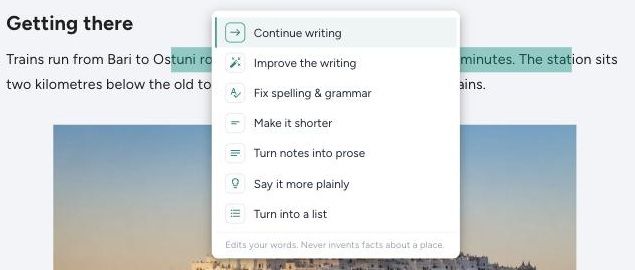
Select some words and click AI, or press ⌘J (Ctrl+J on Windows) and it
takes the paragraph your cursor is in. Pick an action from the list, or type
what you want into the field above it.
What it does
- Continue writing — carries on from where you stopped, in your voice, using what you have written so far
- Improve the writing — tighter and clearer, still yours
- Fix spelling & grammar — nothing else changes
- Make it shorter — cuts repetition and hedging, not information
- Turn notes into prose — for the line you typed as "bus 12, 40 min, hot"
- Say it more plainly — shorter sentences, everyday words
- Turn into a list — pulls the practical points out of a paragraph
Ask for anything else
The list cannot know what you want from every paragraph. The field above it takes a request in your own words:
- "make this a call to action"
- "more casual"
- "translate this into German"
- "turn this into a list of reasons to go"
Type it and press Enter. It works on the words you selected. It also reads your title and the paragraphs on either side, so it knows what the post is about and what "it" in your first sentence refers to.
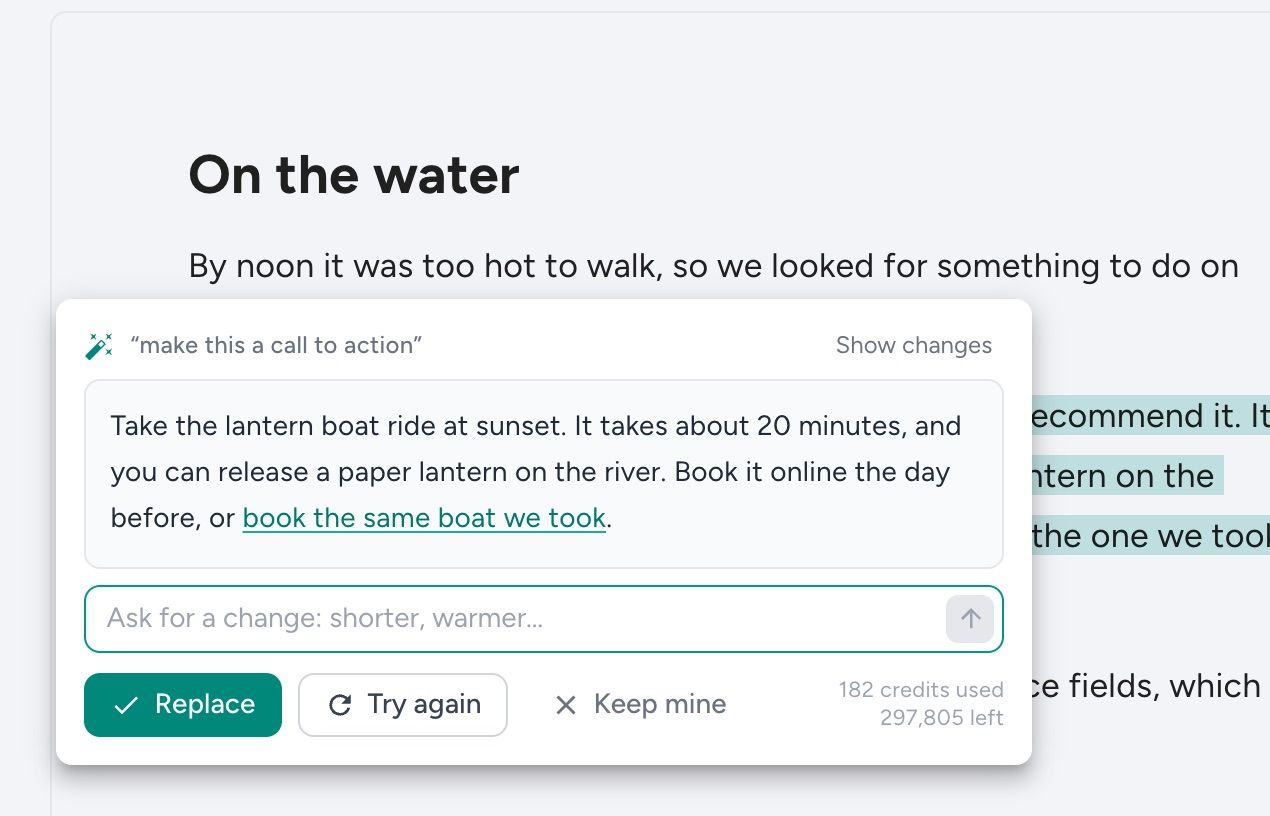
Your links stay links. The paragraph with the booking link in it is often the one you want reworded. The link goes along with the request: the words it sits on can change, so "here" can become "book the same boat we took", and it still leads where you pointed it. The suggestion underlines the link so you can see where it ended up. If a version leaves one of your links out, the editor tells you before you press Replace.
Not quite right? The field under the suggestion changes that suggestion: "shorter", "warmer", "less like an advert". Each round works on the version in front of you.
You can ask a question too. "Is this too long?" gets an answer, not a rewrite, and an answer is never put into your post.
Nothing changes until you say so
A rewrite is shown as a difference against what you wrote — the words it wants to remove struck through, the words it wants to add marked. You can see exactly what it changed instead of reading two paragraphs side by side and trying to spot it.
That matters more than it sounds. A suggestion shown as a clean paragraph is a suggestion nobody actually reads; they glance at it and press the button.
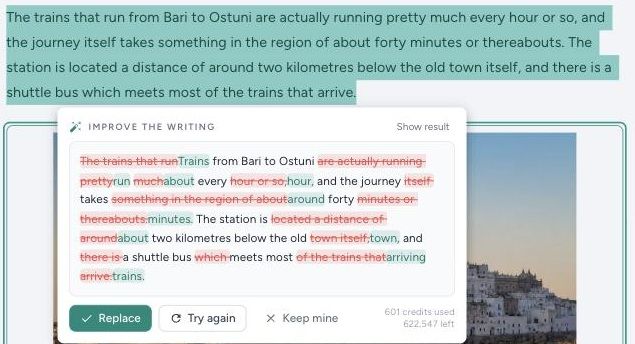
- Replace puts it in your post — or Insert, after Continue writing, because that one adds to what you wrote instead of replacing it.
- Try again gets you another go.
- Keep mine throws it away.
Three of them open on the result rather than the difference. Continue writing adds words instead of changing any, Turn into a list rearranges a paragraph into bullets, and a request you typed is usually a rewrite; a word-by-word difference of any of them is noise rather than something you can read. Show changes switches to the difference anyway.
What it will never do
It does not know anything about the place you are writing about, and it is not allowed to pretend it does.
Continue writing is the only one that adds prose, and it writes from the paragraphs you have already written. Everything else reworks the words you selected. None of them can add an opening time, a price, a bus number, a distance or a recommendation that is not already in your text. If you did not write what the ticket cost, it will not guess.
A request you type yourself follows the same rule. Ask it to add the opening hours and it tells you it does not have them. It also will not put urgency or promises in your mouth: no "limited time" and no "best price" unless you wrote it.
That limit is the point. A model that fills in an opening time is wrong in the way that costs your reader an afternoon and costs you their trust, and it is wrong invisibly — the sentence reads perfectly.
If you want facts checked, check them. This is a copy editor, not a researcher.
Describing your photos
Every photo has a description field, and the wand beside it writes one by actually looking at the picture. It reads your caption and post too, so it can put the right name to what it sees.
This is the one place the AI adds something rather than reworking it, and it is the one worth using on every post: photo descriptions are what Google Images has to go on and what a blind reader hears, and most travel posts have none. Read what it writes before moving on — it can see a church on a hill, but not that it is the one you climbed to.
In the SEO panel
Two more, in the SEO sidebar:
- Suggest focus phrases from the post — five phrases people would actually search for
- Write the meta description for me — the two lines under your title in Google
Both read your finished post and summarise it. Same rule: nothing that is not already in what you wrote.
What it costs
AI actions use credits, charged on what the request actually used — a short paragraph costs a fraction of a long one. Most edits come to a few hundred credits, so a million credits is well over a thousand of them. Every result tells you what it cost and what you have left, so nothing is a surprise.
Every plan includes credits each month and you can top up if you run out. Your balance is in the dashboard.
Writing a whole article with AI Blogger is the expensive one — around 150,000 credits, because it reads every photo and writes the piece from end to end rather than editing one paragraph you already wrote. Everything on this page is the cheap kind.