

Three ways to get a photo into a post, and the fastest one is not the menu:
- Drag it in from Finder or your file manager and drop it on the paragraph it belongs under. It lands where you dropped it.
- Paste it — copy a picture anywhere, put the cursor where you want it, and paste.
- Press
/and pick Photo if you would rather use a file picker.
Whichever you use, you can keep writing while it uploads.
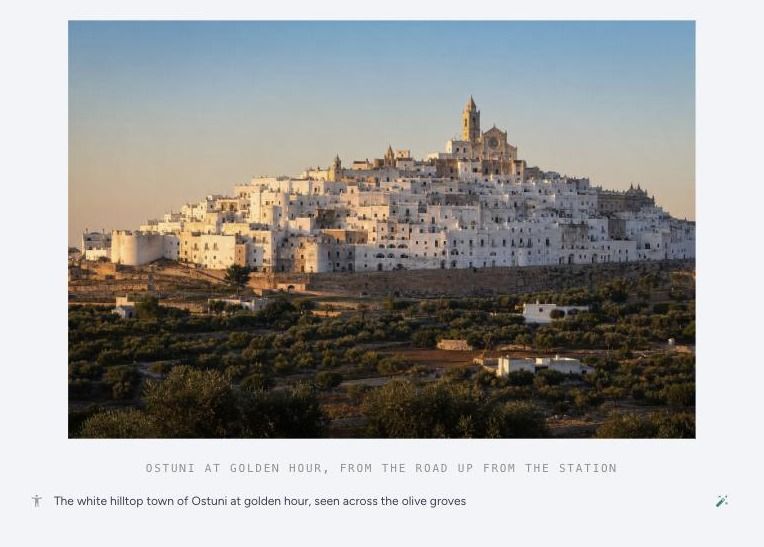
Caption
The line under the picture, which readers see. It is a proper editable line, not a plain text box: you can put a link in it, which is how you credit a photographer or point at the place you shot.
Leave it empty if the photo does not need one. A caption that only says "Rome" under a photo of Rome is worse than nothing.
Description
The field below the caption, marked with a small figure icon. Readers never see it. It is what a screen reader announces, and what Google Images has to go on.
Most travel posts skip it — around three in five photos on TravelFeed have no description at all — and it is the single easiest SEO win available to you. Google Images is real travel traffic, and a photo with no description is invisible to it.
Write what is in the frame, plainly. "The whitewashed rooftops of Ostuni at sunset, with the cathedral tower in the middle" tells both a search engine and a blind reader something. "IMG_4821" tells them nothing.
Or let AI write it
The wand next to the description field looks at the actual photo and writes one for you. It uses a few AI credits, and it reads your caption and post so it puts the right name to what it sees.
Check what it gives you before you move on. It can see a church on a hill; it cannot know that it is your church on that hill unless your post says so.
Making a photo a link
Hover the photo and click the chain icon in the top right. Useful for a banner you want tapped, or a photo that should open the booking page for the place it shows.
What happens to your photo
Every upload is stripped of its metadata before it is stored — the GPS coordinates, the camera, the timestamp. Phones write your exact position into every shot, and a camera roll has your home in it as often as it has a piazza. Stripping it does not change how the photo looks.
Your photos are then resized for whatever screen the reader is on, so a 20-megapixel original does not get sent to a phone on hotel wifi.
A big landscape photo runs wider than the text column on travelfeed.com, which is what you want for a view. Everything else sits in the column with the writing.