

Today we are releasing the new editor in TravelFeed. It works similar to the old EasyEditor: You can add a new block by starting a new line and either click the + or type / (this is new: it was tab in the old editor). Blocks can still be all kinds of different things, from simple paragraphs, headings and tables to photo galleries and map embeds. You can drag blocks around to move them up and down. To format text or add links, just as before, highlight the text you want to format.

Pasting formatted text works much better now. The new editor also supports basic Markdown: ** and * are converted into the preview as soon as you close the tag, and headings can be created with ## at the start of a line.
We have also expanded the use of AI inside the editor. The highlight options include an AI button that gives you several AI options, such as fixing spelling & grammar, making it shorter and improving the writing. You can also open the AI panel using the keyboard shortcut ⌘J (Ctrl+J on Windows) if you want to have the AI analyze the full paragraph. Unlike the old editor, the AI suggestion doesn't replace anything directly, but shows you a preview that you can accept or reject.
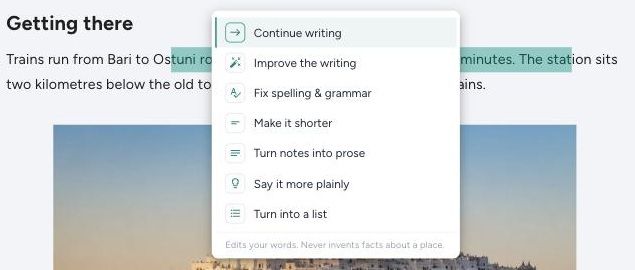
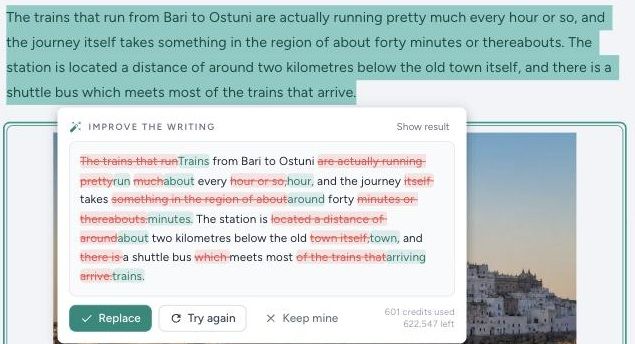
Also, you can now directly create and embed Magic Maps itineraries from inside the editor. And the SEO panel in the side comes with improved performance and AI enhancements and shows you a preview of how your post will look like in Google, helping you optimise your posts to rank better.
The new editor also brings new options that will take effect in TravelFeed Hosting in the next update. For your own site, you can control the attributes of each link in your posts.
For the full list of features, check our help center article on using the editor. If you would rather keep using the old editor, you can switch back in the settings.
We have done lots of testing of the new editor, but this update is a big one. If you notice a bug, please let us know.
AI Blogger Updates
We have also redesigned the AI Blogger from scratch. The idea of AI Blogger has always been that it helps you write a blog from your own notes. But with the original version, especially when the supplied notes were to thin, it could happen that the AI would hallucinate and write up classic slop to fill the gaps - exactly what we wanted to prevent in the first place. The new AI Blogger uses smarter AI and now requires you to upload at least 5 of your own photos in addition to your trip notes.

AI then looks at your photos and trip notes and clusters the photos based on GPS data and image recognition matched to your notes. It then interviews you based on the things that would be great content for the post but were missing from your notes, such as where did you stay, what did X cost, what did you find overrated, where was this photo taken etc. The more you answer, the better your post will be. It then gives you a few proposals of an article outline. You choose one. Then, the AI identifies information gaps and automatically researches them on the web - things such as entrance fees, travel times or opening times. You then see each researched fact with a source and can approve or reject them. Finally, the AI writes a full post draft for you. It arranges your supplied photos nicely, including in image galleries. Of course, as always, read the draft before publishing and change things the AI got wrong.


Please mind that smarter AI means that the usage of AI credits has increased. All our paid plans include AI credits. Starter and Basic credits are sized for editor AI, Pro and VIP include enough credits for several AI Blogger post drafts per month. As before, if you ever run out, you can top up AI credits easily from 10$.
We believe that AI when used right can be an amazing tool to help you create better blog posts based on your own experiences and photos. As before, we do not curate posts that are generic AI writing without giving your own insights, photos and facts.
If you are posting to Hive, we recommend to choose between using AI writing and enabling rewards. Please read Hivewatchers' rules regarding AI-generated content. Hive is permissionless, so noone can stop you from posting AI generated content, but you will be downvoted if your post is using AI writing and has rewards enabled.